How to update my account numbers in XAUBOT?
Learn how to update your broker account numbers connected to your license key and use your license key on another broker account.
1. Open Subscriptions
Accessing the subscriptions page
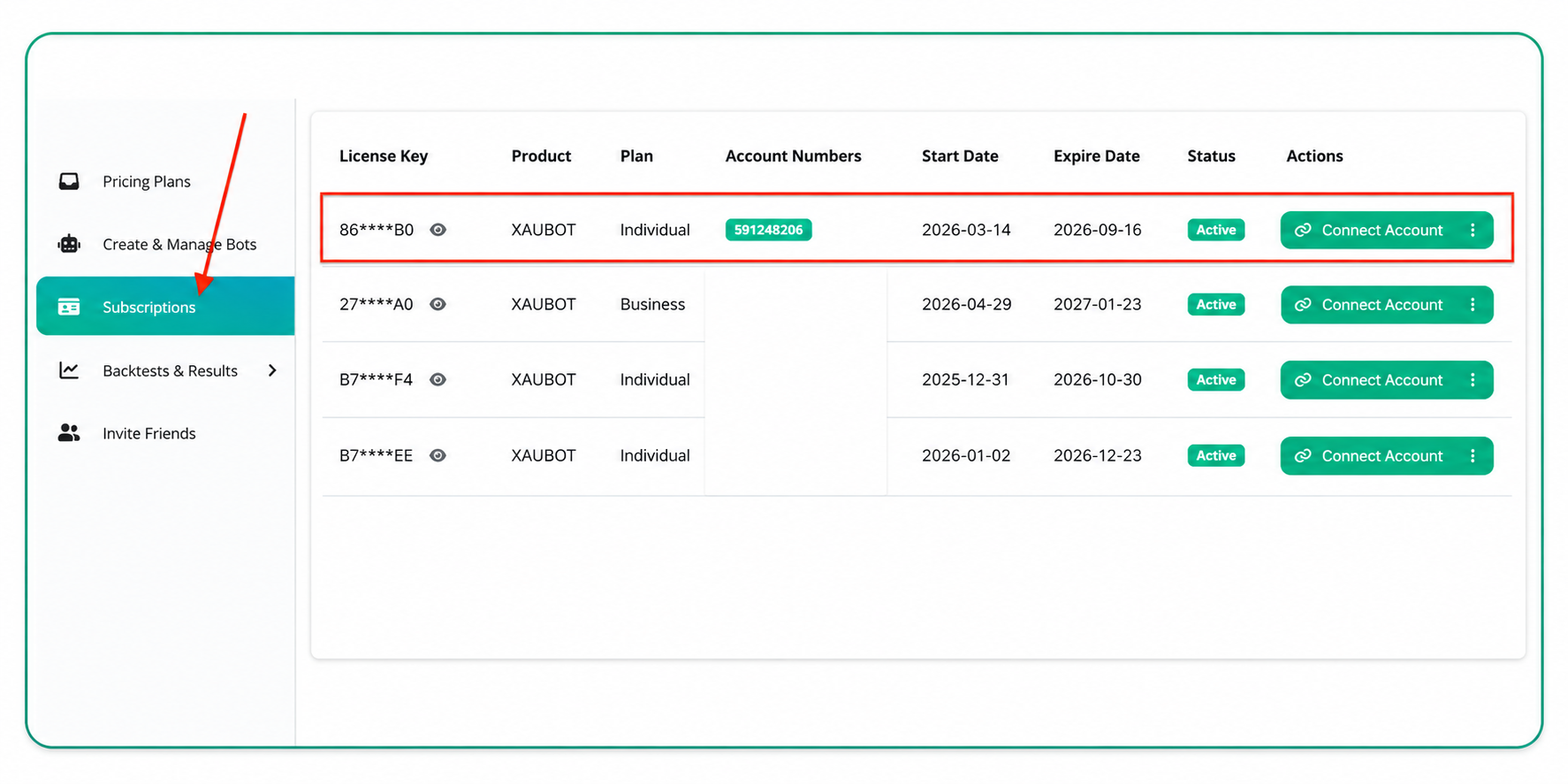
Go to the “Subscriptions” page using the left-hand menu in your dashboard
Once you are on this page, you will see your license key associated with your plan, along with the start date and expiration date
- Click on the “Connect Account” button to open a new page where you can edit your broker account number
2. Remove Account Number
Go to the “Subscriptions” page using the left-hand menu in your dashboard
Once you are on this page, you will see your license key associated with your plan, along with the start date and expiration date
2. Remove Account Number
- Once you click the button, you will see the current account numbers connected to your license key
- Remove the account number and enter the new one
- Then click on Save Changes
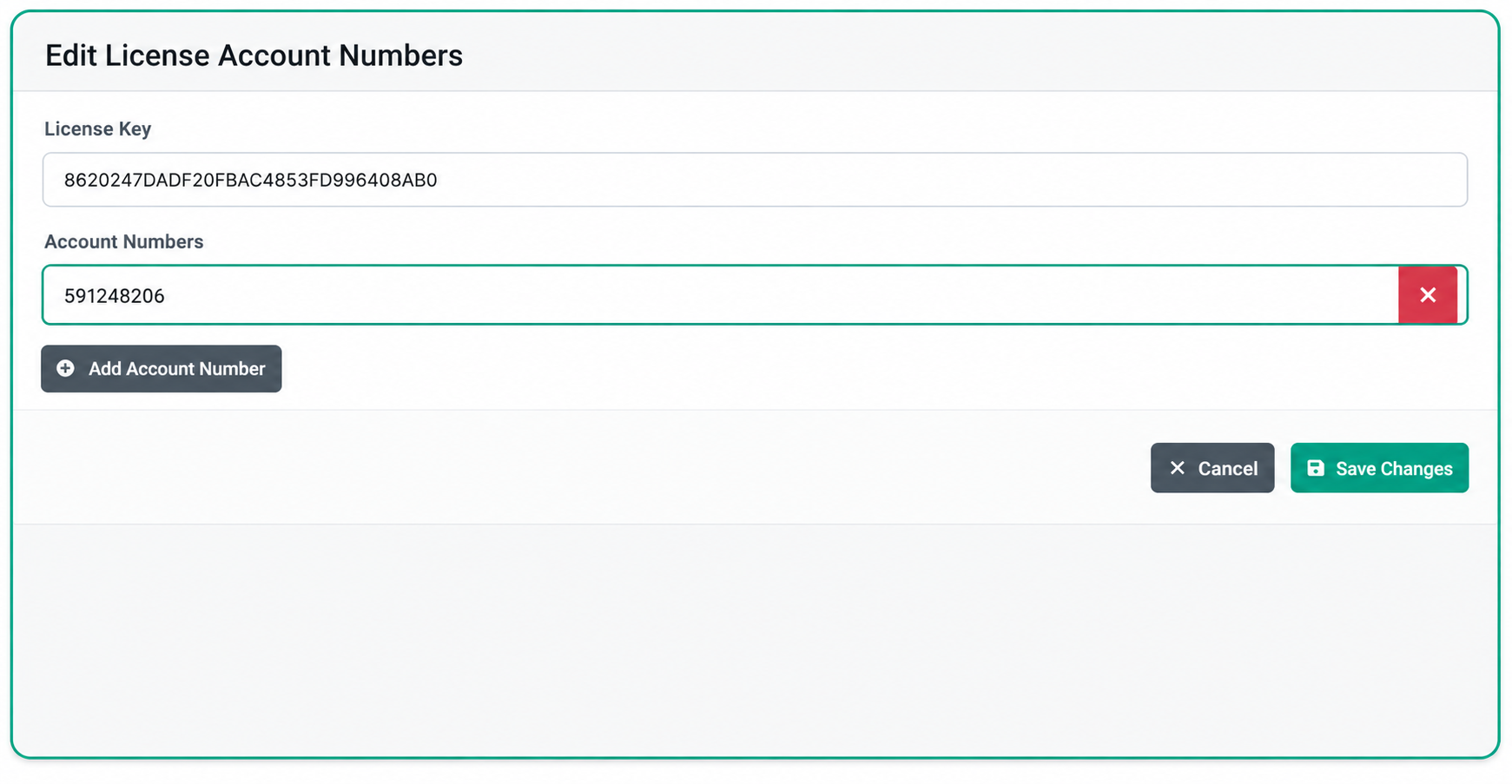
Once you click the button, you will see the current account numbers connected to your license key
Remove the account number and enter the new one
 If you don’t know your account number, you can check this article to find your unique number.
 3. Copy and paste your license key
- Once your license is connected to your new account number, copy your license key and use it in your bot settings
- Open your MetaTrader, then click on your bot name at the top right cornerremove-accu
- Double-click on the first parameter, called “Input Your License Key”, and paste your license key there
4. Your bot is Live
- Once everything is set up, you should see a “Live” message on your bot screen, as long as there are no errors.
Happy trading and enjoy automated trading with XAUBOT!
Happy trading and enjoy automated trading with XAUBOT!
Related Articles
What is the XAUBOT license key?
Learn what is the XAUBOT license key and where you can find it to use in your bot settings. 1. What is a License Key? A license key is a unique code used to activate and verify your software or trading bot . It confirms that you have a valid ...How to buy an XAUBOT subscription?
Learn how to activate your 15-day trial or purchase a premium subscription. Includes payment methods. New to XAUBOT? You’ll be offered a 15-day trial plan when signing up The trial begins once you select this subscription in your dashboard No charges ...How to connect my broker account to my license?
Learn how to connect your broker account number to your license key after registering for your preferred plan. 1. Open Subscriptions Accessing the subscriptions page Go to the “Subscriptions” page using the left-hand menu in your dashboard Once you ...What Is a broker account number and how to find it?
A broker account number is a unique identifier assigned to your investment account by a brokerage firm. It works much like a bank account number—helping the brokerage track your assets, transactions, and account activity securely. 1. What is a Broker ...How to enable news filter in XAUBOT?
Learn how the XAUBOT News Filter works, how to enable it, and how it helps avoid high-impact news events to reduce trading risk and improve stability. 1. What is the News Filter? The News Filter is a feature that helps the trading bot avoid opening ...