How to download my bot?
Download bot
Learn how to download your created bot from the dashboard to use on MetaTrader (MT4 or MT5)
1. After Review your bot
- One the final step of the bot creation process, your bot is compiled and ready for download
- Your will be provided with two versions of the bot file: MetaTrader 4 and MetaTrader 5. Select the version that corresponds to your broker account type
- Click the Download button to download the bot file to your computer
 If you close this page before downloading your bot, you can still access it from your dashboard. Navigate to the Manage Bots section to view all your created bots and download them at any time.
2. Manage your bots
After creating your first bot, you can review and download your bot files form the Create and Manage Bots page in your dashboard.
Click the Action button for the bot you want to download. The available MT4 and MT5 versions will be displayed. Select your preferred version to automatically download the file to your system.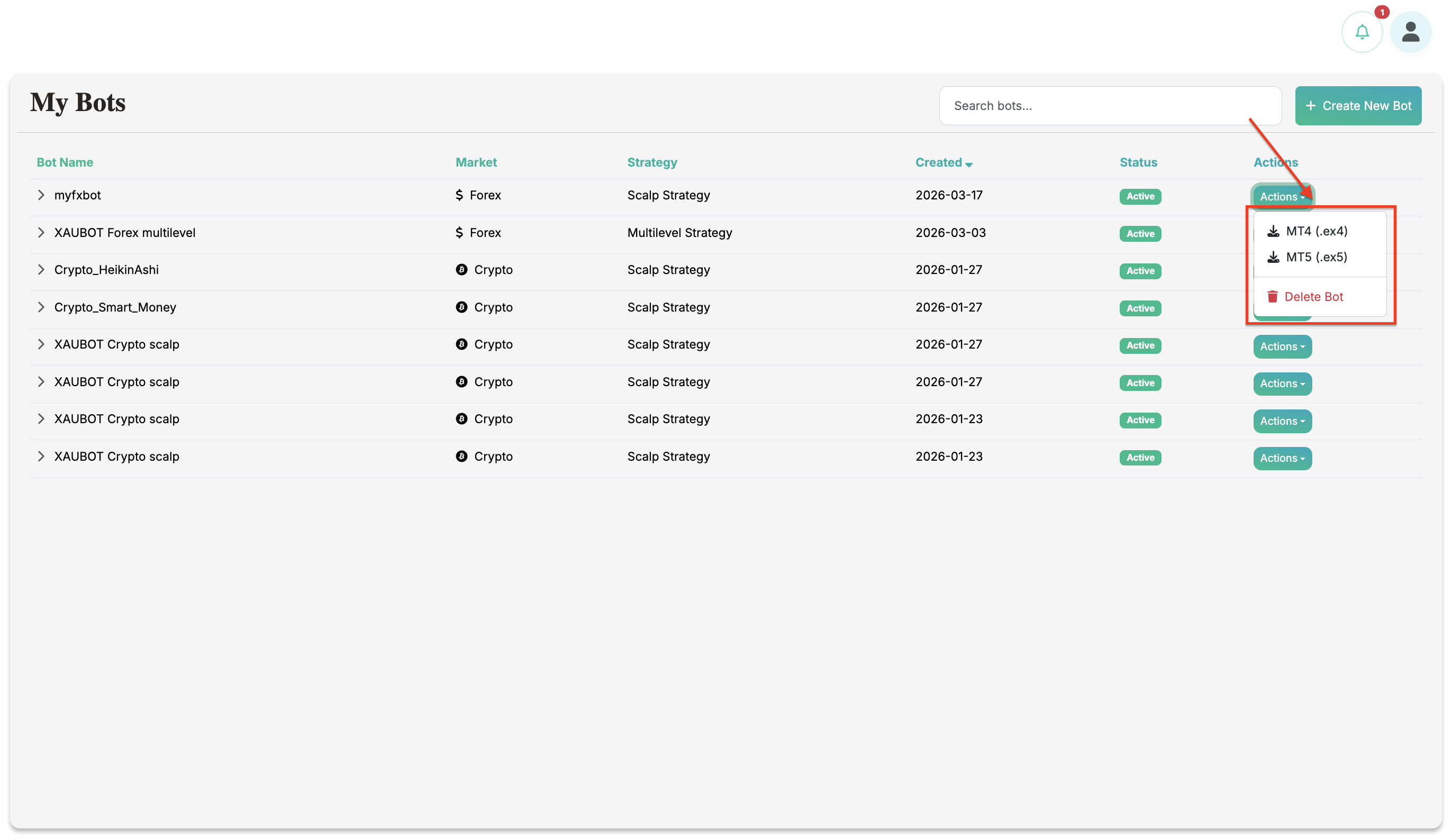
After creating your first bot, you can review and download your bot files form the Create and Manage Bots page in your dashboard.
Click the Action button for the bot you want to download. The available MT4 and MT5 versions will be displayed. Select your preferred version to automatically download the file to your system.
For further assistance, check out the helpful articles and videos available in the XAUBOT Help Center and on YouTube, or contact the support team.
Happy trading and enjoy automated trading with XAUBOT!
Happy trading and enjoy automated trading with XAUBOT!
Related Articles
How to create my scalp bot?
Scalp bot: Getting started Learn what the Scalp Bot is, how to use it, and when it is best suited for your strategy. This guide also includes the setup process and trading conditions. 1. What is a Scalp bot? The Scalp strategy focuses on capturing ...How to install my trading bot on MT5?
Learn how to install your created bot on MetaTrader 5 (MT5) step by step. 1. Download your bot After creating your first bot, you can review and download your bot files form the Create and Manage Bots page in your dashboard. Click the Action button ...How to install my trading bot on MT4?
Learn how to install your created bot on MetaTrader 4 (MT4) step by step. 1. Download your bot After creating your first bot, you can review and download your bot files form the Create and Manage Bots page in your dashboard. Click the Action button ...How to enable news filter in XAUBOT?
Learn how the XAUBOT News Filter works, how to enable it, and how it helps avoid high-impact news events to reduce trading risk and improve stability. 1. What is the News Filter? The News Filter is a feature that helps the trading bot avoid opening ...What is the XAUBOT license key?
Learn what is the XAUBOT license key and where you can find it to use in your bot settings. 1. What is a License Key? A license key is a unique code used to activate and verify your software or trading bot . It confirms that you have a valid ...