How to buy an XAUBOT subscription?
Learn how to activate your 15-day trial or purchase a premium subscription. Includes payment methods.
 New to XAUBOT?
- You’ll be offered a 15-day trial plan when signing up
- The trial begins once you select this subscription in your dashboard
- No charges will be made during the trial, and you’ll be notified on the final day to decide whether to continue
- The trial is only available once per user
1. Open the Pricing Plans on the left menu
2. Choose your plan duration
You can select from:
Monthly Plan
Annual Plan
The annual plan is paid with one lump sum upfront. Prices indicated on the screen are the monthly equivalent prices after the annual plan discount has been applied.
Note: For Annual subscriptions, the full amount will be charged immediately for the respective duration.
Let's choose Annual.
Let's choose Annual.
3. Choose the plan you want
Let's choose the annual Pro plan to purchase.
Let's choose the annual Pro plan to purchase.
4. Select your country and complete the payment
By clicking Continue, you agree to our Terms and Conditions. It is important that you read and understand all of these documents to prevent further questions and possible inconvenience.
By clicking Continue, you agree to our Terms and Conditions. It is important that you read and understand all of these documents to prevent further questions and possible inconvenience.
5. Fill in the payment credentials
If you choose Apple Pay or Google Pay, you need to log into your account and/or confirm the payment.
The payment is made right after the confirmation of the payment method!
You can cancel at any time! And you can get a full refund within 14 days, according to our Refund policy.
6. That's it! XAUBOT subscription is yours
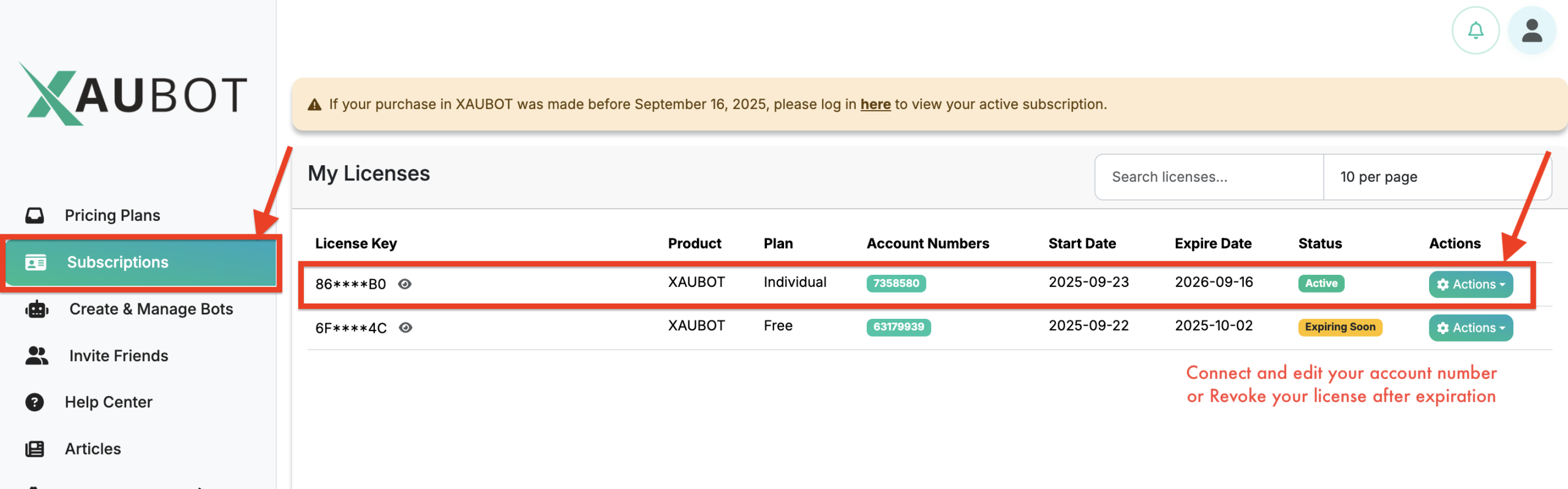
7. Check your current subscription
You need to go to the Subscription page and see your active licenses. There, you can Connect an account number to a license, Change it at any time, or Revoke the license after it expires.
You need to go to the Subscription page and see your active licenses. There, you can Connect an account number to a license, Change it at any time, or Revoke the license after it expires.
Happy trading and enjoy automated trading with XAUBOT!
Happy trading and enjoy automated trading with XAUBOT!
Related Articles
Available subscription plans
If you're new to XAUBOT, welcome, and thank you for your interest in our software! You can create a free XAUBOT account using just your email address. After registering, you can activate a free trial to explore the platform and test different ...What is the XAUBOT license key?
Learn what is the XAUBOT license key and where you can find it to use in your bot settings. 1. What is a License Key? A license key is a unique code used to activate and verify your software or trading bot . It confirms that you have a valid ...How to update my account numbers in XAUBOT?
Learn how to update your broker account numbers connected to your license key and use your license key on another broker account. 1. Open Subscriptions Accessing the subscriptions page Go to the “Subscriptions” page using the left-hand menu in your ...How to enable news filter in XAUBOT?
Learn how the XAUBOT News Filter works, how to enable it, and how it helps avoid high-impact news events to reduce trading risk and improve stability. 1. What is the News Filter? The News Filter is a feature that helps the trading bot avoid opening ...How to connect my broker account to my license?
Learn how to connect your broker account number to your license key after registering for your preferred plan. 1. Open Subscriptions Accessing the subscriptions page Go to the “Subscriptions” page using the left-hand menu in your dashboard Once you ...